ایجاد ساختار برای درج Document
سعی کنید خودتان مراحل نوشتن این کد را تمرین کنید تا بتوانید براحتی از آن در طراحی وبسایت شخصی خود استفاده کنید.
<!DOCTYPE html>
<html>
<head>
<title>Page Title</title>
</head>
<body>
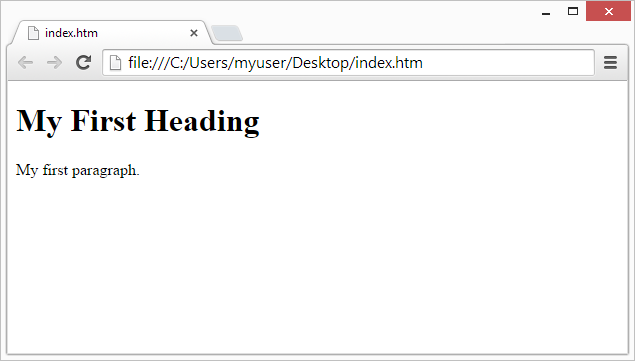
<h1>My First Heading</h1>
<p>My first paragraph.</p>
</body>
</html>
*********************************
- The<!DOCTYPE html> declaration defines that this document is an HTML5 document
- نشان میدهد که این کد، یک کد Html است.
- The <html> element is the root element of an HTML page
- نشانگر ریشه و آغاز کدهای html است.
- The <head> element contains meta-information about the HTML page
- شامل اطلاعات متای صفحه Html است.
- The <title> element specifies a title for the HTML page (which is shown in the browser’s title bar or in the page’s tab)
- مشخص کننده عنوان صفحه Html است (که در نوار عنوان مرورگر یا در تب نشان دهنده صفحه نمایش داده میشود)
- The <body> element defines the document’s body and is a container for all the visible contents, such as headings, paragraphs, images, hyperlinks, tables, lists, etc.
- این تگ نشانگر بدنه ساختار کد است و دربرگیرنده محتویاتی است که نمایش داده میشوند،مانند هدینگ، پاراگرافها، تصاویر، هایپرلینکها، جداول، فهرستها و بسیاری موارد دیگر است.
- The <h1> element defines a large heading
- این تگ بیانگر متن هدینگ در سایز بزرگ است.
- The <p> element defines a paragraph
- این تگ برای تعریف یک پاراگراف بکار میرود و در ابتدای خط نوشته میشود.
What is an HTML Element?
مبنای Html چیست؟
An HTML element is defined by a start tag, some content, and an end tag:
ساختار کدهای Html بر مبنای تگ شروع، محتوا و تگ انتهایی بناد گذاشته شده است.
The HTML element is everything from the start tag to the end tag:
عنصر اصلی Html تمام محتویاتی هستند که بین تگهای شروع و تگ پایانی قرار میگیرند.
| Start tag | Element content | End tag |
|---|---|---|
| <h1> | My First Heading | </h1> |
| <p> | My first paragraph. | </p> |
| <br> | none | none |
Note: Some HTML elements have no content (like the <br> element). These elements are called empty elements. Empty elements do not have an end tag!
توجه کنید: بعضی از المانهای Html دربرگیرنده هیچ محتوایی نیستند (مانند المان <br>) که به آنها المانهای خالی گفته میشود. این المانها در انتها تگ پایانی (بسته شونده) ندارند.
Web Browsers
مرورگرهای وب
The purpose of a web browser (Chrome, Edge, Firefox, Safari) is to read HTML documents and display them correctly.
منظور از مرورگرهای وب (مانند کروم، edge، فایرفاکس و سافاری) محیطی است که کدهای Html در آنها بدرستی نمایش داده میشوند.
A browser does not display the HTML tags, but uses them to determine how to display the document:
مرورگرهای وب کدهای Html را نمایش نمیدهند، بلکه چگونگی نمایش کدها را مشخص میکنند.